
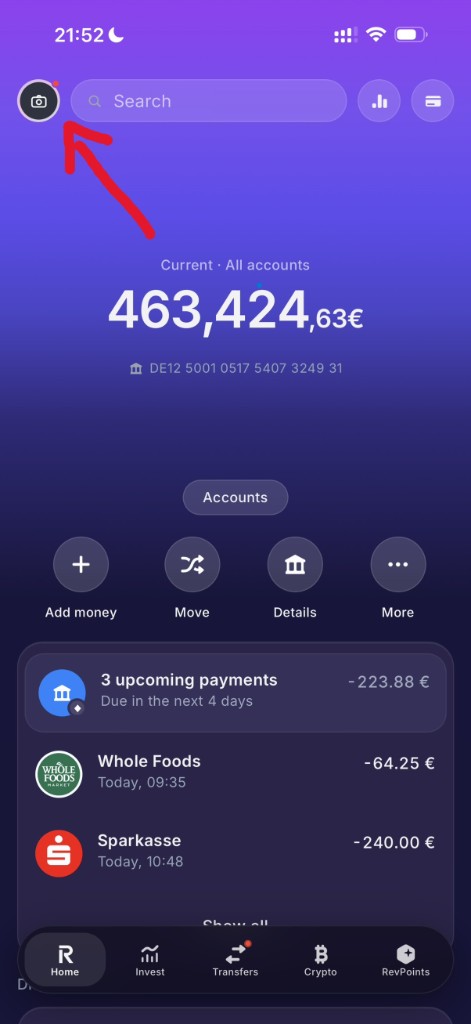
Tap your avatar
On the home screen, tap the round profile button at the top left (next to Search).
LARPZ is entertainment software. Fake banking UI for content & pranks — not a real bank, not affiliated with Revolut or any financial institution. Official site: larpz.de. We never ask for real bank passwords or credentials. Read disclaimer · Fair use
How it works
Buy with crypto, redeem your code, then customize balances, transactions, stocks, and crypto inside Account data.
Setup
Choose Starter, Popular, or Lifetime on the checkout page. Select a network (USDT, BTC, ETH, or SOL) and create your order.
Copy the wallet address and send the precise amount shown — down to the last digit. That unique amount is how we match your payment.
Once the payment is detected on-chain, your code appears on the checkout page and is emailed to you. Keep that email — you'll need the code.
Open larpz.de/app, enter your license code, pick Deutsch or English, then set a 6-digit passcode. You'll use that passcode to unlock the app next time.
Not on the App Store. On iPhone use Safari → Share → Add to Home Screen. On Android use Chrome → Install app / Add to Home screen. It shows up as LARPZ Demo with the app icon.
On the home screen tap your avatar (top left) → Account details. See the visual guide below for screenshots.
Payment tip
Always send the exact crypto amount shown for your order. Round numbers or missing decimals can delay detection. Keep the checkout page open — confirmation is usually within minutes.
Visual guide
Three taps — then edit balances, IBAN, persona, transactions, and more.
On the home screen, tap the round profile button at the top left (next to Search).
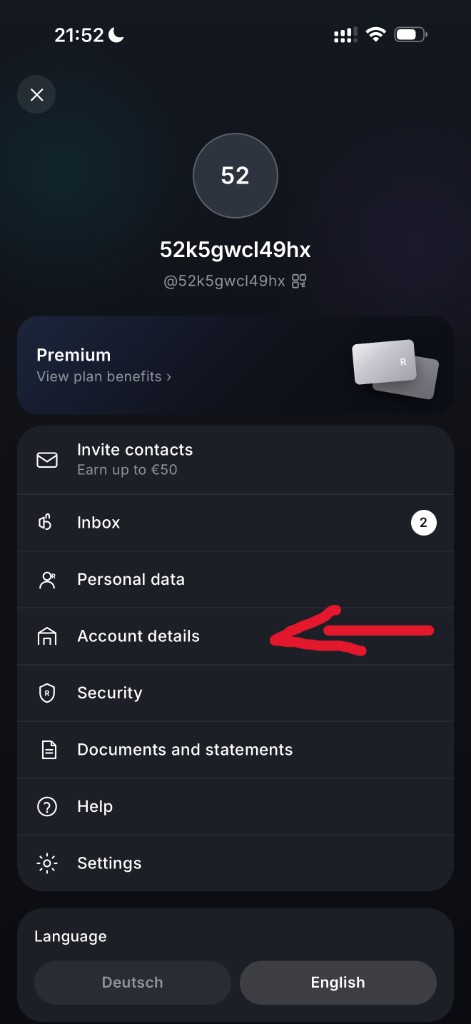
In Profile, tap Account details — that’s the editor for balances, IBAN, persona, and more.
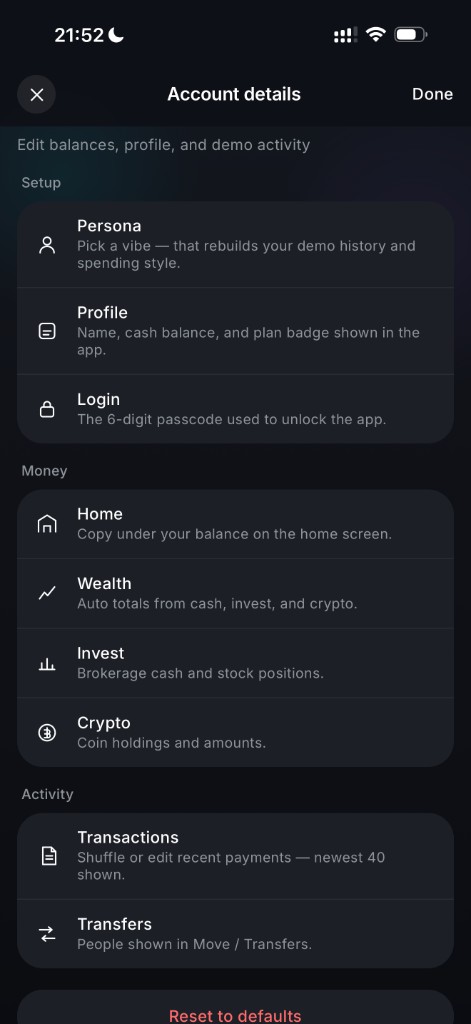
Setup (persona, profile, login), Money (home, wealth, invest, crypto), and Activity (transactions, transfers). Changes save automatically.
Account data
Path: Avatar → Profile → Account data. Edits autosave after a short pause — no extra Save button.
In Account data open the Profile tab. Edit display name, full name, username, initials, and cash balance. Use the dice button to randomize the balance. The home screen updates right away.
Open the Persona tab and choose Student, Standard, Business, Wealthy, or Luxury. That rebuilds your profile vibe and regenerates transactions. Fine-tune luxury %, activity, income, and home city — then regenerate if you want a fresh history.
Go to the Transactions tab. Reroll home / invest / crypto / everything, edit the newest entries (merchant, amount, ± direction, subtitle), delete rows, or add a payment. Tap any transaction on the home screen later to open the detail view.
Invest tab: edit portfolio cash, add/remove tickers and amounts. Crypto tab: add coins and quantities. Totals calculate automatically and show on the Invest / Crypto tabs in the app.
In the app use Move / Transfers to send demo money to another LARPZ username — balance goes down and a new transaction appears. Edit transfer contacts under Account data → Transfers.
Avatar → Profile → Language switches Deutsch / English. Each language keeps its own demo data blob — edits in German are not auto-copied to English.
Leave the app open on the dashboard and new demo transactions can appear in the background (based on your persona activity). No toggle needed — it runs while the tab is visible.
At the bottom of Account data: Reset to defaults rebuilds a fresh demo (keeps your persona). Profile → Log out clears the session and brings you back to the license screen. Your code stays valid on this device until the plan expires.
Good to know